
Pick Several Keys on the Timeline: Move and Delete Frames Together
In Brinimate you can now pick several keyframes at once with Shift, Ctrl or a drag, and move or delete them in one go. One undo step.
LuisOA
Brinimate Team
Picking several keys on the timeline
Until now, keys on Brinimate’s timeline were handled one at a time. Now you can pick several at once and move them, delete them or change their in-between together. It’s exactly what you need when an animation has lots of keys, like the ones the stickman actions generate.
Ways to pick
| You do | It happens |
|---|---|
| Click a key | That key is picked. |
| Shift+click another | Every key between the two is picked. |
| Ctrl+click (Cmd+click on Mac) | Add or remove a single key. |
| Drag across empty frames | The keys inside that stretch are picked. |
| Right-click → Pick all of the layer’s keys | All of them, at once. |
| Esc | Drops the selection. |
Picked keys show a green border and background.
 Five keys picked: a range with Shift and a single one with Ctrl.
What you can do with them
- Move them together: drag any picked key and they all move at once, keeping the distance between them. They never jump over a key you didn’t pick.
- Delete them: press Delete. Each removed span goes to the key before it, just like deleting one.
- Change the in-between: on the right-click menu, Create linear tween or Remove tween applies to every picked key.
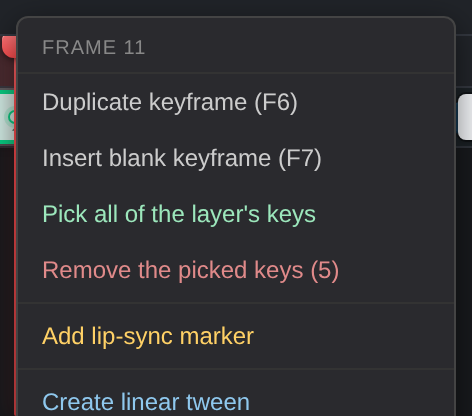 Right-clicking a picked key acts on the whole group.
Delete won’t wipe your drawing by mistake. If something is selected on the canvas, Delete removes keys only when the timeline was the last thing you touched. If you touched the canvas, Delete is still for the canvas.
Everything undoes with Ctrl+Z in a single step.
Moving a single key (unchanged)
- Drag a key to change when it happens.
- Alt+drag copies it: that’s how a walk cycle ends on its first pose.